Workshop Overview
What Problem Does LiveCap Solve?
In multilingual meetings, participants often struggle to follow conversations happening in a language they are not fluent in. Traditional solutions either require a human interpreter (expensive and slow) or depend on meeting-platform plugins that store audio recordings on third-party servers.
LiveCap is a browser-based, real-time bilingual caption application that:
- Captures microphone audio inside the browser – no plugin or app install needed.
- Streams compressed PCM audio over a secure WebSocket directly to a backend.
- Produces Vietnamese ↔ English bilingual captions in near real time using Amazon Transcribe and Amazon Translate.
- Stores only finalized TXT transcripts in a private S3 bucket; raw audio is never recorded.
Who Is This For?
| Audience | Use Case |
|---|---|
| Meeting participants | Follow bilingual conversations without a human interpreter |
| Teams with AWS accounts | Deploy a working AI-powered SaaS prototype end-to-end |
| Cloud practitioners | Learn ECS Fargate, WebSocket streaming, and AWS AI services together |
Use-Case Category
LiveCap falls into two overlapping categories:
- AI/ML Application – uses Amazon Transcribe Streaming and Amazon Translate as the core intelligence layer.
- Web Application – delivers a React frontend through CloudFront + S3 and a FastAPI backend through ECS Fargate behind an ALB.
AWS Services Used
| Service | Role in LiveCap |
|---|---|
| Amazon CloudFront | Public HTTPS/WSS entry point; routes static assets and API/WebSocket traffic |
| Amazon S3 | Private frontend hosting (OAC) and private TXT transcript storage |
| Application Load Balancer | Health checks and HTTP/WebSocket forwarding to the Fargate container |
| Amazon ECS Fargate | Serverless container runtime for the FastAPI backend |
| Amazon ECR | Immutable container image registry (Git SHA tags) |
| Amazon Transcribe Streaming | Converts 16 kHz PCM audio chunks to partial/final text |
| Amazon Translate | Translates finalized segments between Vietnamese and English |
| AWS WAF | Blocks managed threats and rate abuse at both CloudFront and ALB |
| AWS Lambda | Wake-on-demand: scales ECS from 0 → 1 before the first session |
| Amazon CloudWatch | Receives structured application logs and AWS service metrics |
| AWS IAM | Least-privilege roles for the ECS task, Lambda, and ECR execution |
Verified As-Deployed Architecture
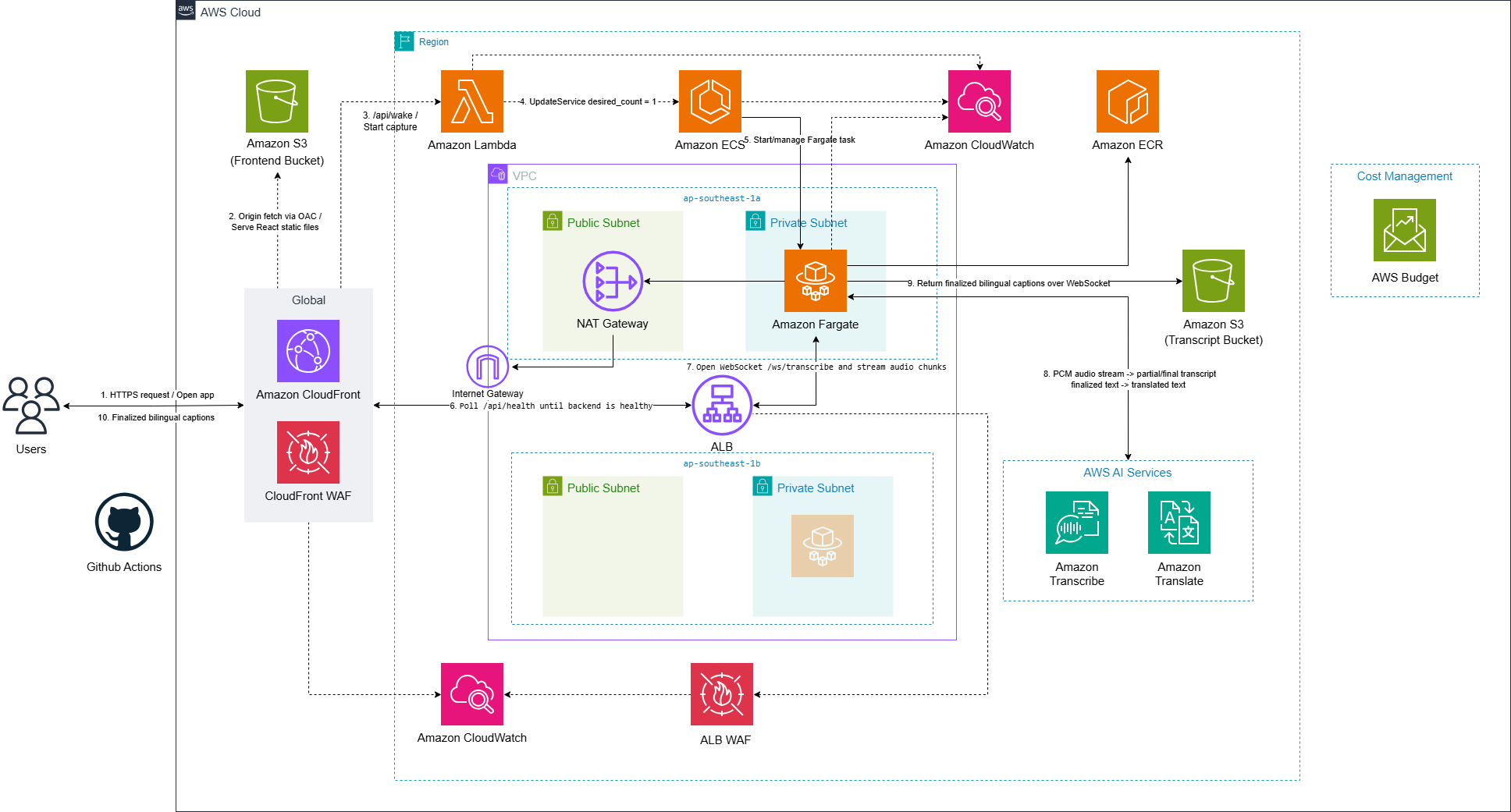
The diagram below shows LiveCap’s current deployed architecture: a custom VPC with private Fargate subnets, NAT Gateway, scale-to-zero, WAF, dashboard, and budget. After the blue/green cutover, the rollback stack was retired; only the target ALB serves API and WebSocket traffic.
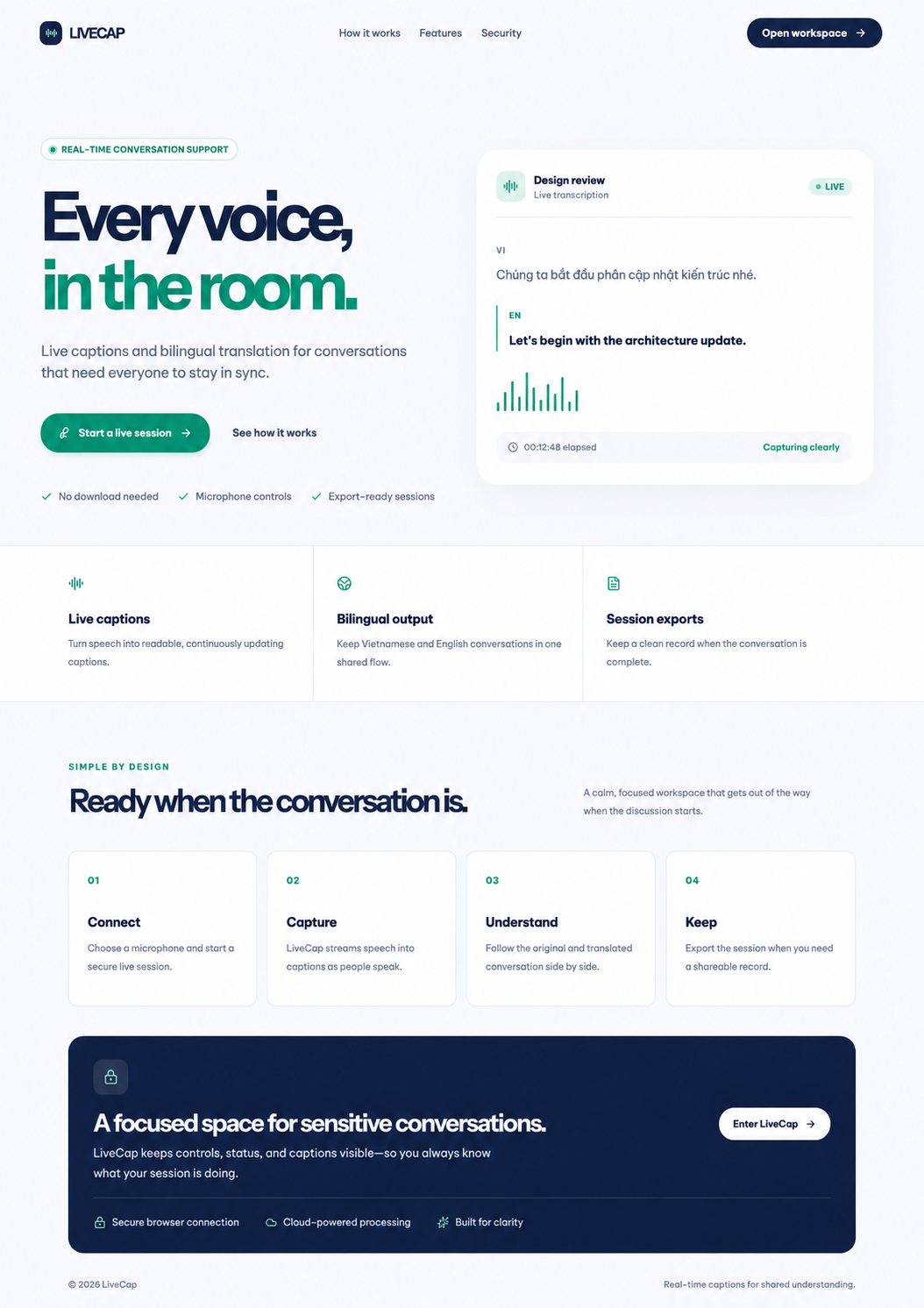
The LiveCap landing page (served from CloudFront via private S3 with OAC):
Main Runtime Flow
- CloudFront serves the React/Vite frontend from a private S3 bucket using Origin Access Control (OAC) — the bucket has no public access.
- User clicks Start; the frontend calls
/api/wakethrough CloudFront, which routes to a Lambda function that scales ECS from 0 → 1 if needed. - The frontend polls
/api/health, requests microphone permission, then opens/ws/transcribeover WSS through CloudFront → ALB → Fargate. - FastAPI checks global/per-IP session limits before starting AWS streams.
- 16 kHz PCM chunks are forwarded to Amazon Transcribe Streaming (two parallel streams: Vietnamese and English).
- Only finalized segments are sent to Amazon Translate and appended as bilingual caption rows; partial results are shown transiently and discarded.
- Captions travel back: Fargate → ALB → CloudFront → browser.
- Export: the frontend posts finalized rows to
/api/sessions/{id}/export, which writes a TXT object to the private transcript bucket and returns a time-limited presigned URL.