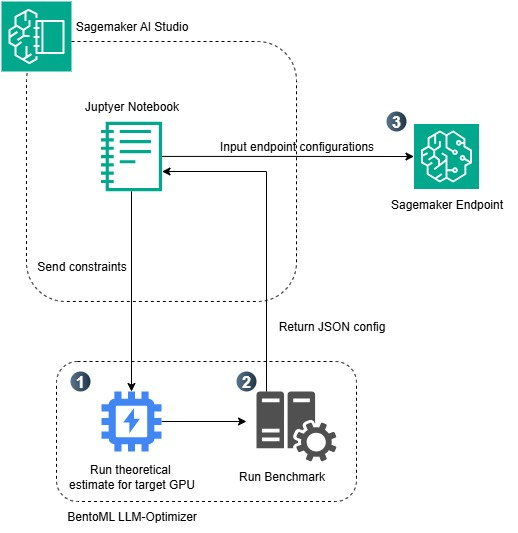
Optimizing LLM Inference on Amazon SageMaker AI with BentoML LLM Optimizer
Deploying open-source Large Language Models (LLMs) into a production environment is a complex process. The combination of Amazon SageMaker AI and BentoML LLM Optimizer offers a comprehensive solution to automate the configuration process, thoroughly solving the challenge of balancing performance and infrastructure costs.
Below is a detailed breakdown of this approach:
1. Challenges in Running LLMs in Production
When deploying LLMs, engineers often face significant technical hurdles:
- Expensive hardware costs: Billion-parameter models require GPU instances with large VRAM capacities, which can consume a massive budget if not properly optimized.
- The trade-off between latency and throughput: Increasing throughput often leads to increased latency, directly impacting the end-user experience.
- Time-consuming manual tuning: Finding the perfect combination of instance type, tensor parallelism, and quantization requires numerous trial-and-error iterations.
2. How Does BentoML LLM Optimizer Solve This Problem?
This tool acts as an automated search and benchmarking system, completely replacing guesswork:
- Automated Profiling: It simulates real-world traffic to measure the model’s performance across various GPU instances (such as G5 and P4 on AWS).
- Standardized Packaging: BentoML automates the containerization of the model and its dependencies, ensuring consistency from the development environment to the cloud.
- Deep Integration with SageMaker AI: It leverages AWS’s fully-managed infrastructure, enabling smooth auto-scaling and ensuring enterprise-grade security standards.
3. Key Takeaways
- Efficient VRAM Optimization: The system provides exact parameters for applying quantization (e.g., FP16, INT8), helping large LLMs run stably even on GPUs with limited memory.
- Optimal Configuration Recommendations: It specifically identifies the AWS Instance type that delivers the highest throughput at the lowest cost per token.
- Risk Mitigation: It prevents over-provisioning that causes resource waste, or under-provisioning that leads to system bottlenecks during traffic spikes.
4. Business Value
Adopting this architecture completely frees MLOps and Data Engineering teams from the burden of writing manual test scripts. It shortens the time-to-market for Generative AI features from several weeks to just a few days, while also bringing transparency and strict control over monthly cloud costs.
5. Basic Deployment and Usage Steps
To apply this solution to a real-world project, the general process typically includes the following steps:
- Step 1 - Environment Preparation: Install the
bentomllibrary and AWS-supported tools (likebentoML-sagemaker), and configure an IAM Role with permissions to interact with SageMaker and Amazon ECR. - Step 2 - Model Definition (Bento Build): Create configuration files (like
service.pyandbentofile.yaml) to declare the LLM you want to use. Then, run the BentoML build command to package the model into a standard format. - Step 3 - Launching LLM Optimizer: Activate BentoML’s benchmarking tool. The system will automatically provision test environments on AWS and run load tests with various hardware and software parameters.
- Step 4 - Evaluation and Configuration: The Optimizer will return a visual report comparing throughput and latency. Based on this analysis, you can select the configuration with the optimal p99 latency and cost for your specific use-case.
- Step 5 - Deploy to SageMaker: Use the selected configuration to push the container to Amazon ECR and create a SageMaker Endpoint directly via BentoML’s CLI commands, completing the process of taking the model to production.