Analyzing the Attack Flow Logs Feature in AWS Shield Advanced
Recently I came across a post on the AWS Security Blog introducing the Attack Flow Logs feature of Shield Advanced. Until now, when hit by a DDoS attack, administrators only knew “the system is under attack” through a few high-level metrics on CloudWatch, without seeing the details of each traffic flow — reconstructing the attack meant piecing together data from multiple sources. This new feature fills exactly that blind spot: it records the essential information of the attack traffic such as source/destination IP, port, protocol, and country, right while the incident is happening.
How it works
Right during an attack, Shield records the metadata of each traffic flow: source/destination IP, port, protocol, TCP flags, packet/byte counts — and 3 notable fields:
- srccountry: the source country of the attack
- location: the AWS edge location where the traffic enters
- action: how Shield handled each flow — concrete mitigation evidence instead of guesswork.
Logs are exported on a 5-minute cycle (both during and after the attack), each file up to 75 MB, supporting JSON / plain text / W3C / Parquet.
Where do the logs go?
Once generated, the logs don’t flow to your machine on their own — they pass through a “pipeline” of 3 building blocks:
- DeliverySource — the sender: declares “which Shield protection this log comes from”.
- DeliveryDestination — the receiver: declares “where the log goes” (S3, CloudWatch Logs, or Firehose).
- Delivery — the carrier: connects the sender to the receiver. Only after creating this do the logs start flowing.
Choosing the storage destination depends on your needs:
- S3 → long-term storage, queried with Athena to investigate after the attack.
- CloudWatch Logs → quick observation right during the attack (using Logs Insights).
- Data Firehose → stream directly to a third-party SIEM (e.g., Splunk, Elastic…).
The nice thing about splitting into these 3 blocks is the flexibility of combining them: multiple Sources can point to the same Destination, allowing an organization with many accounts to consolidate all DDoS logs into one central bucket (via cross-account configuration).
Two limitations to know before using it
- On scope: it currently only supports resources protected via Elastic IP. Common web entry points like CloudFront or ALB are not yet supported. In other words, systems sitting behind CloudFront/ALB can’t use it for now.
- On cost: on top of the Shield Advanced subscription fee, enabling flow logs also incurs additional CloudWatch Logs vended logs charges and the cost of the destination resources (S3 storage/log group, or Firehose processing).
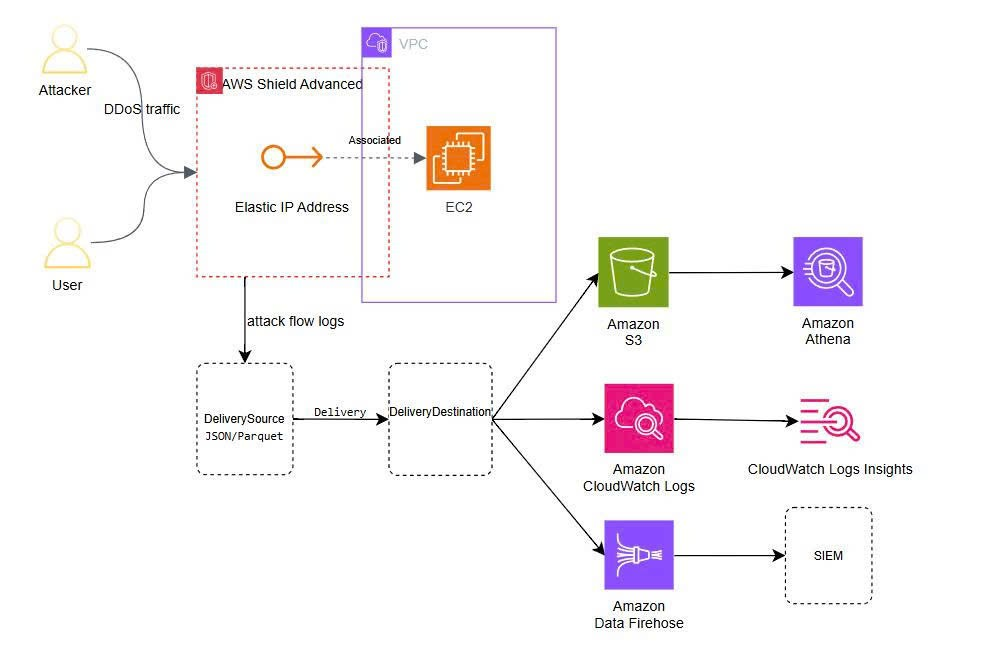 (Note: The diagram above is a flow diagram I drew to illustrate the operation flow, not a reference architecture for deployment)
In summary
Attack Flow Logs doesn’t help Shield block better — it solves the problem of being able to see and prove the attack.
Source: Gain visibility into DDoS attacks with flow logs in AWS Shield Advanced