Automating Recommendation Engine Training with Amazon Personalize and AWS Glue
Personalizing the user experience consistently drives revenue growth for businesses. However, applying Machine Learning (ML) to build a real-world Recommendation Engine remains a significant barrier for many. The combination of AWS Glue and Amazon Personalize offers a fully serverless architectural solution, helping to automate the data preparation and model training processes without the need to build a complex Data Lake from scratch.
Below is a detailed breakdown of this approach:
1. Challenges in Building Real-World Recommendation Systems
When embarking on personalization, organizations often encounter the following technical hurdles:
- Data fragmentation: In modern microservices architectures, data is often scattered across multiple sources (Relational DB, NoSQL, Data Warehouse). Collecting and synchronizing this data requires immense effort.
- Limitations of rule-based systems: Many companies still rely on manual, rule-based approaches for product recommendations. These systems are rigid, lack intelligence, and are difficult to maintain as the product catalog scales.
- Lack of ML expertise: Building, training, and optimizing recommendation algorithms require a dedicated team of Data Scientists, a resource not every organization has readily available.
2. How Do AWS Glue and Amazon Personalize Solve the Problem?
This architecture clearly separates the data processing pipeline from the AI training pipeline, maximizing the use of fully-managed services:
- Automated data integration (AWS Glue): Acts as a serverless ETL service. AWS Glue Crawlers automatically scan fragmented data sources to identify their schemas. Then, Glue ETL Jobs (running on Apache Spark) clean, normalize, and export the data to a CSV format stored centrally in Amazon S3.
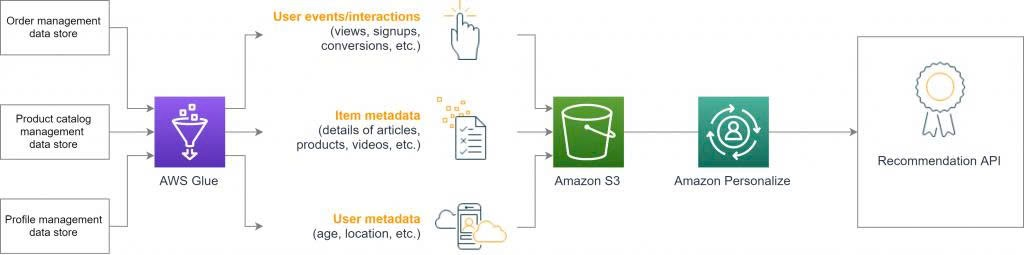
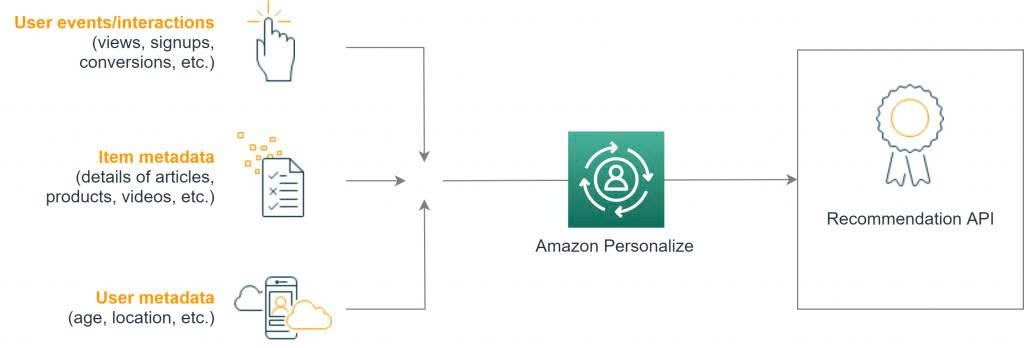
- Automated ML training (Amazon Personalize): Once the data converges in S3, Personalize takes over the complex ML workload. It automatically selects the most suitable algorithm based on three core datasets: Interactions, Users, and Items.
- End-to-End Serverless Architecture: Both services automatically scale according to actual demand, completely eliminating the server management and provisioning burden for the engineering team.
3. Key Takeaways
- Smoothly solving the “Cold Start” problem: By combining mandatory Interaction data with User and Item Metadata, the system can provide accurate recommendations even for brand new customers or newly launched products.
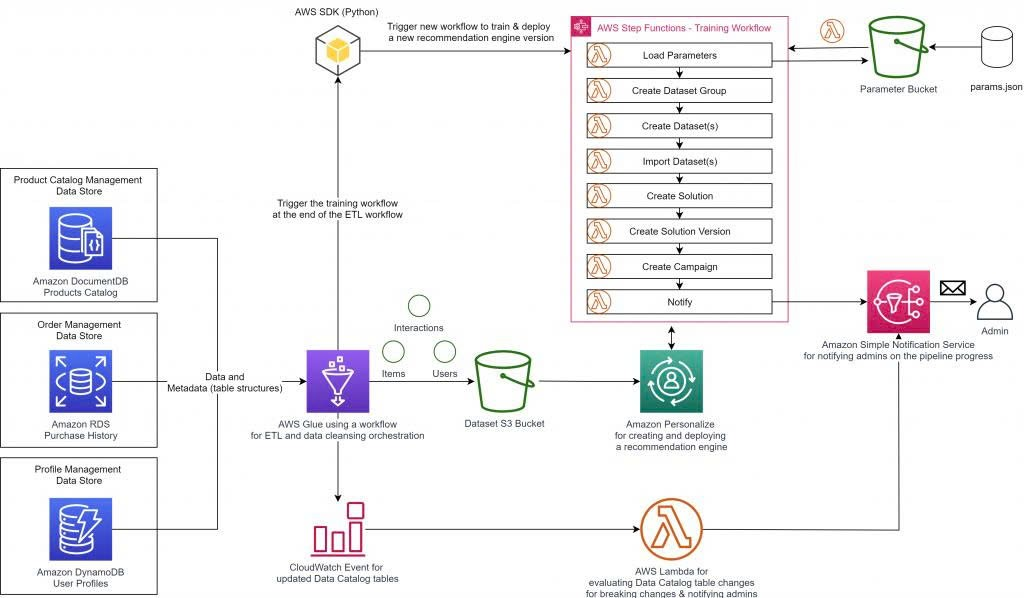
- Preventing data pipeline breaks: The automated schema update feature of the AWS Glue Data Catalog ensures the Data Pipeline remains uninterrupted even when microservice teams modify their database structures independently.
- Providing a direct Inference API: Amazon Personalize not only trains the model but also automatically packages and provides an Inference API, allowing your application to call and retrieve personalized recommendations in real-time.
4. Business Value
This architecture enables organizations to quickly deploy a Proof of Concept (POC) using their own historical data. It drastically shortens time-to-market, optimizes operational costs, and allows businesses to own a smart Recommendation Engine without needing to invest in a massive Data Lake or hire a large team of ML experts right from the start.
5. Basic Deployment and Usage Steps
To apply this solution to a real-world project, the general process includes the following steps:
- Step 1 - Extract data structure: Use AWS Glue Crawlers to scan existing data sources (e.g., from S3, RDS, DynamoDB) and automatically create metadata tables in the AWS Glue Data Catalog.
- Step 2 - Transform and export data: Configure AWS Glue ETL Jobs (using Python or Scala) to map the data columns to the specific format required by Personalize. Then, export these CSV files into an Amazon S3 bucket.
- Step 3 - Initialize Dataset Group: In the Amazon Personalize console, create a new Dataset Group and define the corresponding Schemas for the Interactions, Users, and Items datasets.
- Step 4 - Model Training: Import the data from S3 into Personalize and proceed to create a Solution. The service will automatically train and fine-tune the underlying Machine Learning models.
- Step 5 - Deploy Endpoint: Create a Campaign from the newly trained Solution. Personalize will then provision an API Endpoint so your application can integrate and query product recommendations immediately.